
Overview
What are webhooks?
Webhooks allow you to subscribe to certain events that happen in Timeero. When one of these events are triggered we’ll send a HTTP POST payload to the webhook’s configured URL.
You’ll need to configure an endpoint our servers can call whenever user data changes trigger notifications. Once webhooks are active, we’ll send the requested event data, changes, and notifications.
How to setup webhook configuration
How to setup webhook configurationWe allow webhook to be subscribed through our web application by going to the Integrations > Public API > Configurations page. To ensure webhook delivery is secure and reliable, Timeero enforces the following security requirements.
HTTPS Requirement
- Webhook URLs must use HTTPS
- HTTP URLs are not allowed
- HTTPS ensures that webhook payloads are encrypted in transit and protected from interception or tampering
Example of a valid webhook URL:
https://example.com/webhooks/timeero
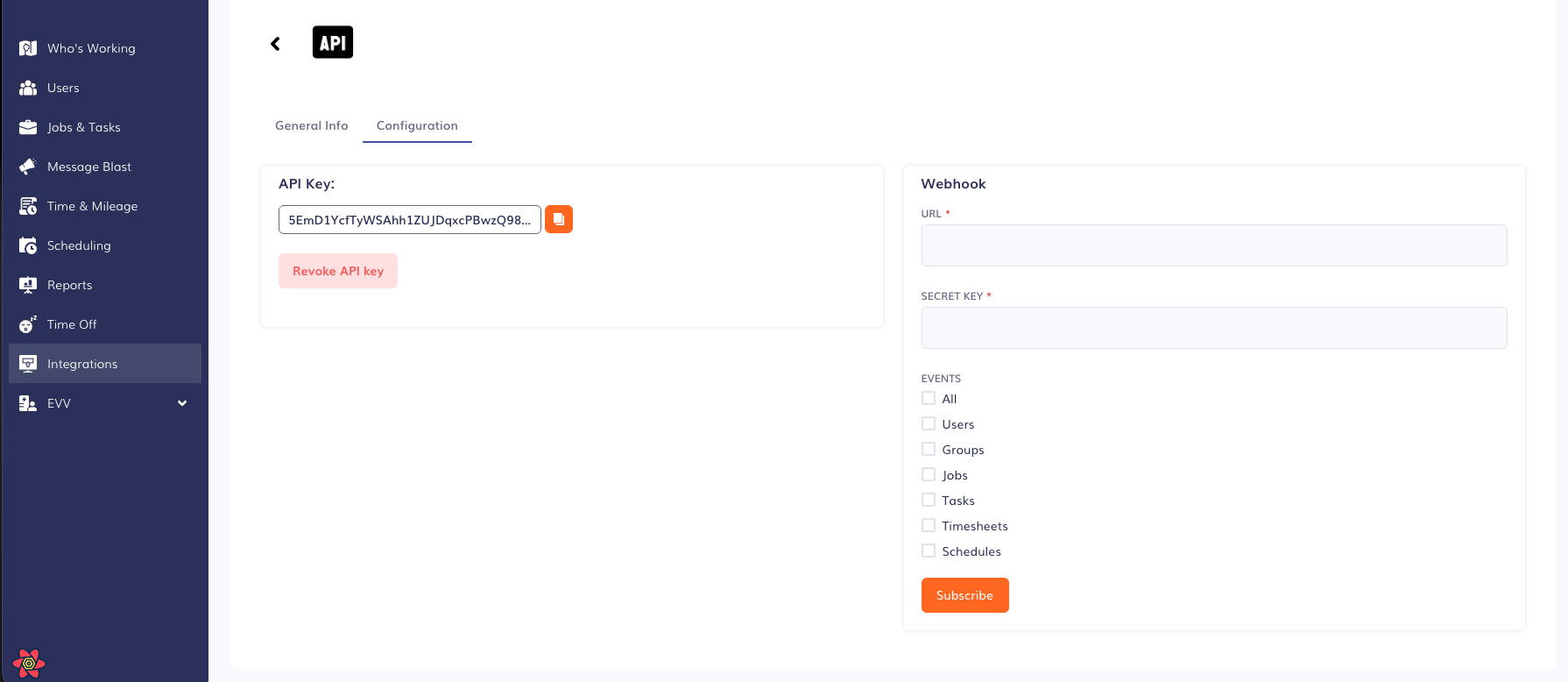
Click Subscribe to configure webhook events.
Authenticating Webhook Events
In order to authenticate that a webhook event was sent from Timeero and can be trusted, HTTP headers like the following examples are included on each request:
x-webhook-timestamp: 1617756644
x-webhook-signature: 197530c52c590212c3cbbfa......
To ensure the webhook event is authentic, verify the request using the provided x-webhook-timestamp and x-webhook-signature headers.
Headers
x-webhook-timestamp: The timestamp when the event was generated.x-webhook-signature: The SHA-256 hash of the timestamp and payload.
Steps to Authenticate
- Extract Headers: Retrieve
x-webhook-timestampandx-webhook-signaturefrom the headers. - Compute Signature: Compute the SHA-256 hash of the
x-webhook-timestampconcatenated with the request payload using your shared secret. - Compare Signatures: Compare the computed signature with the
x-webhook-signatureheader. If they match, the request is authentic.
Example Code
Below is an example implementation in PHP for authenticating webhook events:
// Your shared secret
$sharedSecret = 'your_shared_secret';
// Extract headers
$timestamp = $_SERVER['HTTP_X_TIMESTAMP'];
$signature = $_SERVER['HTTP_X_SIGNATURE'];
// Get the request body
$requestBody = file_get_contents('php://input');
// Compute the signature
$computedSignature = hash_hmac('sha256', $timestamp . $requestBody, $sharedSecret);
// Compare signatures
if (hash_equals($computedSignature, $signature)) {
    // Signature is valid
    echo 'Webhook event is authenticated.';
} else {
    // Signature is invalid
    echo 'Invalid signature.';
}
?>
Events
When you configure a webhook you choose the category of events you'd like to subscribe to. Within each category there are certain types of events that can happen (e.g. create, update, delete).
| Event Category | Event Types | Description |
|---|---|---|
| Users | Create, Update, Delete | Triggered when a user is created, updated, or deleted |
| Groups | Create, Update, Delete | Triggered when a group is created, updated, or deleted |
| Jobs | Create, Update, Delete | Triggered when a job is created, updated, or deleted |
| Tasks | Create, Update, Delete | Triggered when a task is created, updated, or deleted |
| Timesheets | Create, Update, Delete | Triggered when a timesheet is created, updated, or deleted |
| Schedules | Create, Update, Delete | Triggered when a schedule is created, updated, or deleted |
Payloads
Webhook events are sent as JSON payloads in the body of the POST request. Here is an example of a webhook event payload:
{
   "payload":{
      "event":"type",
      "data":{
         "id":46,
         "operation":"operation",
         "last_updated_at":1722519184
      }
   }
}
Updated 8 months ago