
Overview
What Are Custom Fields?
Custom fields are user-defined fields that can store extra information specific to your companies needs.
These fields can be created and managed from the Timeero web application and are returned in API responses.
Custom fields allow you to extend Timeero resources with additional, flexible data without changing the core data model. Currently, custom fields are supported only for the following resources:
Note* Only customer with Premium subscription can use this custom field features.
How to create custom fields in Timeero ?
How to create custom fields in Timeero ?We allow custom field to be created through our web application by going to the Company Settings > Custom Fields tab. Currently, custom fields are supported only for Users, Jobs and Timesheets:
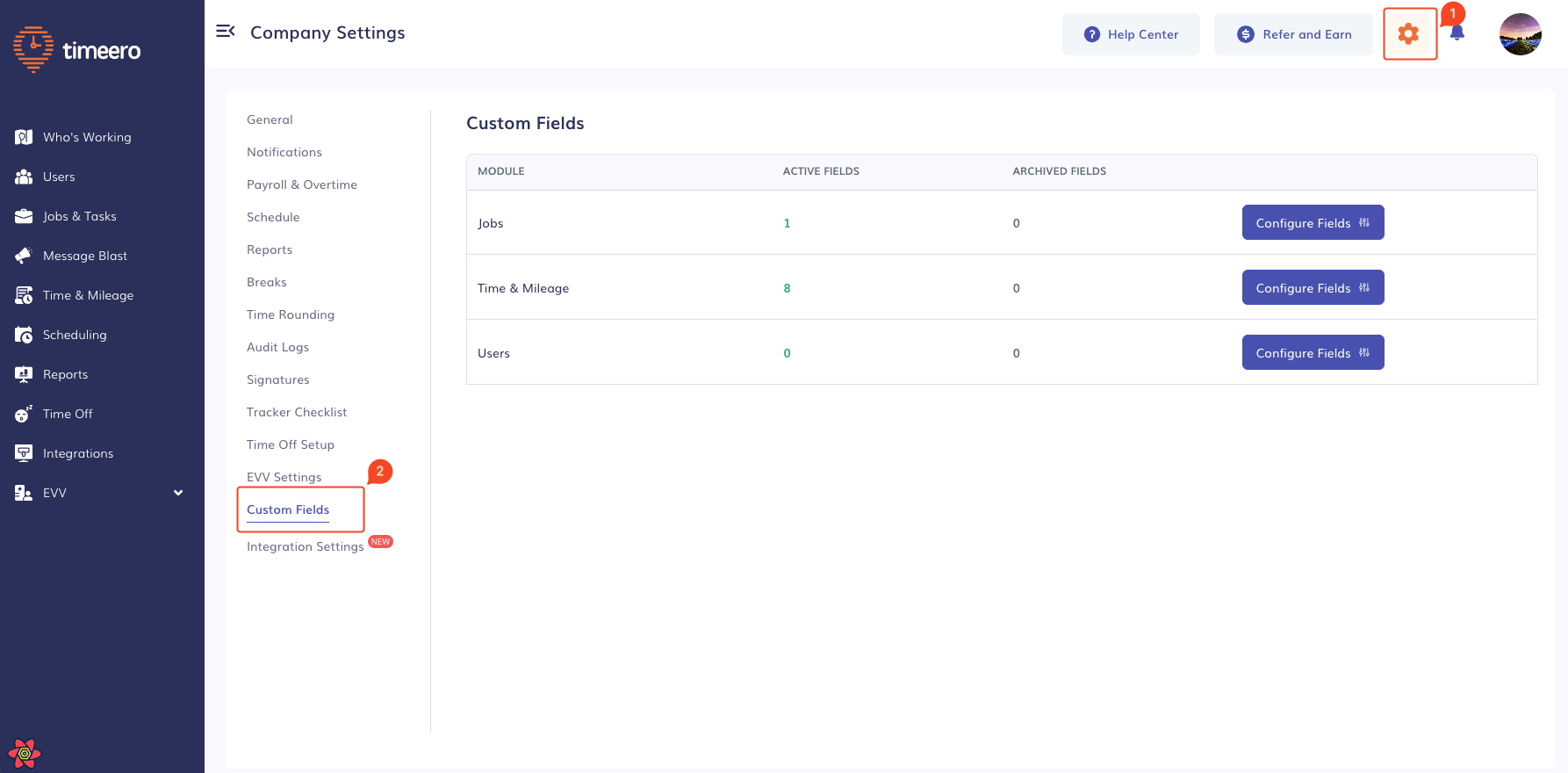
Click Configure Fields to create custom fields.
Custom Field Input Types
The following table describes all supported custom field input types available in Timeero.
These input types define how data is collected and stored for Users, Jobs, and Timesheets.
| Input Type | Description | Example Value |
|---|---|---|
text | Single-line text input for short values | "Project A" |
textarea | Multi-line text input for longer descriptions or notes | "Worked on backend API integration" |
numeric | Numeric input for whole or decimal numbers | 42, 3.14 |
monetary | Currency-based numeric value | 1200.50 |
dropdown | Single selection from a predefined list of options | "Full Time" |
dropdown_multiselect | Multiple selections from a predefined list of options | ["Remote", "Night Shift"] |
checkbox | Boolean value (checked or unchecked) | true |
radio_button | Single selection from a predefined set of options | "Yes" |
date_picker | Date value (ISO 8601 format) | "2026-01-15" |
time_picker | Time value (24-hour format) | "09:30" |
Notes
- Values are returned under the
custom_fieldsobject in API responses - Field validation depends on the input type configuration
- Dropdown and radio options are defined in the Timeero web application
- Date and time values follow standardized formats for consistency
Data Representation
Custom fields are returned as a key-value object under the custom_fields property.
{
  "id": 661,
  "first_name": "Alice",
  "last_name": "Villa",
  "custom_fields": {
    "customFieldId1": "Custom Field Value 1",
    "customFieldId2": "Custom Field Value 2",
  }
}
Reference Public API for Custom Fields.
Updated 8 months ago